
How to Fix Server Connection Problems on MT5 iOS App
1. Check Internet Connection
– Ensure Wi-Fi or mobile data is stable.
– Try switching between Wi-Fi and mobile data.
– Turn Airplane Mode ON, wait 10 seconds, then turn it OFF.
– Ensure Wi-Fi or mobile data is stable.
– Try switching between Wi-Fi and mobile data.
– Turn Airplane Mode ON, wait 10 seconds, then turn it OFF.
2. Check Connection Status
– Check the connection at the top:
Access Server 1 = connected
No Connection = disconnected
– Re-login if disconnected.
– Check the connection at the top:
Access Server 1 = connected
No Connection = disconnected
– Re-login if disconnected.

3. Confirm Correct Server
– Wrong server selection is a common cause.
– Go to Settings → New Account.
– Enter your Hirose Solution Limited.
– Select the exact server name.
– Re-enter your login and password.
– Wrong server selection is a common cause.
– Go to Settings → New Account.
– Enter your Hirose Solution Limited.
– Select the exact server name.
– Re-enter your login and password.
4. Update MT5 App
– Open App Store
– Search MetaTrader 5
– Tap Update (if available)
– Outdated apps may fail to connect to servers.
– Open App Store
– Search MetaTrader 5
– Tap Update (if available)
– Outdated apps may fail to connect to servers.
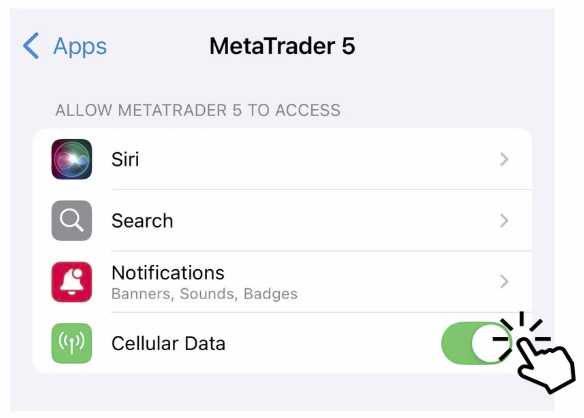
5. Check iOS Network Permissions
– Go to iPhone Settings.
– Go to Apps.
– Tap MetaTrader 5.
– Make sure:
Cellular Data is ON
– Go to iPhone Settings.
– Go to Apps.
– Tap MetaTrader 5.
– Make sure:
Cellular Data is ON
6. Temporary Server Issues
Sometimes the issue is on the broker’s side:
– Server maintenance
– High traffic
– System upgrade
👉 Wait a few minutes and try again.
Sometimes the issue is on the broker’s side:
– Server maintenance
– High traffic
– System upgrade
👉 Wait a few minutes and try again.
7. If Problem Persists
– Prepare the following:
– MT5 Login ID
– Screenshot of error message
– Then contact Hirose Customer Support for assistance.
– Prepare the following:
– MT5 Login ID
– Screenshot of error message
– Then contact Hirose Customer Support for assistance.