
Skip to content

Blog

Register

Login

Hirose Financial
Menu
  • Trading
    • MetaTrader5
      • Metatrader5 Desktop
      • Metatrader5 Mobile
      • MetaTrader5 Web Terminal
    • Trading Conditions
      • Hirose Trading Account Types
      • Spec
      • Deposit
      • Withdrawal
      • Fee
      • Spread
      • Trading Hours
      • Stop Out Level
  • Markets
    • Forex
    • CFD
    • Crypto
    • Metal
  • Insights & Learning
    • Social Trading
    • Tool
      • Analyst Views&Featured Ideas
      • Economic Calendar
    • Academy
  • Partnership
    • IB program
    • Partner
  • Help Center
  • Company
    • Why Choose Hirose
    • Transparent Trading Model (A-Book)
    • Best Price Execution
    • Client Fund Protection
    • Regulation
    • Credit Rating
    • Assess Creditworthiness
    • Management Philosophy
    • Win-Win Partnership
    • About Hirose
    • Hirose Group
    • History
    • Legal Information
    • Contact Us
  • English
    • Indonesian
    • Vietnamese
    • Chinese (Simplified)

How to Fix Login Issues in MT5 (Desktop Version)

1 Check Your Login Details
– Login (Account Number): Must be exactly the one your broker gave you.
– Password: Copy & paste carefully (case-sensitive).
– Server Name: Choose the correct server from the drop-down list.
2 Make Sure You’re Connected to the Internet
– Open a website in your browser to confirm connection.
– If using Wi-Fi, try wired or another network.
3 Verify the Server Address
– In MT5, go to File → Open an Account → search your broker name.
– If you can’t find it, click Add New Broker and type the full server address your broker gave you.
– Once found, try logging in again.
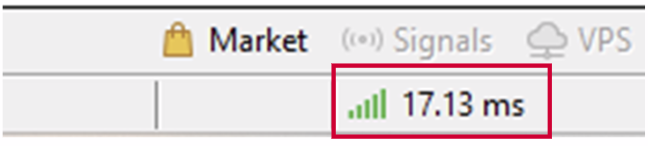
4 Check the Bottom-Right Connection Status
– In MT5, bottom-right corner shows connection:

  • – Green & Red bars + kb numbers = connected.
  • – No bars / “No Connection” = not connected.

If no connection:
– Right-click the account in Navigator → Accounts → Login to Trade Account again.
– Ensure the correct server is selected.
5 Refresh or Re-enter the Account
– In Navigator → Accounts, right-click your account → Login to Trade Account.
– Enter your credentials again.
6 Update or Reinstall MT5
– Sometimes an outdated platform causes connection issues.
– Download the latest MT5 installer from your broker’s website.
– Install over the current version or uninstall/reinstall.
7 Check Firewall or Antivirus
– Windows Firewall or antivirus may block MT5.
– Temporarily disable or add MT5 to the allowed list.
– Then restart MT5.
8 Contact Your Broker
– If all else fails:
– Send them your account number, server name, and a screenshot of the error.
– They can reset your password or verify server status.

Search

Manual MT5

  • 1. Instration
    • 1.1. Introduction to the Metatrader Platform
    • 1.2. Differences between MT4 and MT5
    • 1.3. System Requirements
    • 1.4. How to Install
    • 1.5. Login
  • 2. Interface
    • 2.1. Main Window Layout
    • 2.2. Navigator Panels
    • 2.3. MarketWatch
    • 2.4. Chart Operations
    • 2.5. Toolbox
  • 3. Charts
    • 3.1. Changing Timeframes & Styles
    • 3.2. Adding Technical Objects
    • 3.3. Chart Templates
    • 3.4. Drawing Tools
  • 4. Settings
    • 4.1. Language & Timezone
    • 4.2. Sound & Alert Settings
    • 4.3. Editing Toolbars & Shortcuts
    • 4.4. Customizing and Saving Profiles
  • 5. Opening orders
    • 5.1. Market Orders
    • 5.2. One Click Order
    • 5.3. Depth of Market Order
    • 5.4. Pending Orders (Limit & Stop)
    • 5.5. Modifying or Cancelling Pending Orders
    • 5.6. Setting SL/TP
  • 6. Managing Positions
    • 6.1. Check your positions
    • 6.2. Order History
    • 6.3. Viewing Profit & Loss
  • 7. Closing Orders
    • 7.1. Close Position
    • 7.2. Trailing Stop
    • 7.3. Partial Close
    • 7.4. Hedging
    • 7.5. Bulk Operations
  • 8. Functions
    • 8.1. Inserting Indicators
    • 8.2. Economic Calendar
    • 8.3. Setting Alerts & Notifications
    • 8.4. Utilization of Trading Signals
    • 8.5. Trading Report
  • 9. Expert Advisors
    • 9.1. Installing EAs
    • 9.2. Enabling Automated Trading
    • 9.3. Scripts & Custom Indicators
    • 9.4. Strategy Tester
  • 10. Troubleshooting
    • 10.1. Login Issues
    • 10.2. Chart Not Updating
    • 10.3. Orders Not Executed
    • 10.4. Server Connection Problems
    • 10.5. Invalid S/L or T/P
  • 11. FAQ
    • 11.1. Common Trading Terms
    • 11.2. Frequently Asked Questions
Follow Us

Hirose Solutions Limited

Registered Address: The Colony House, No.41 Nevis Street, P.O. Box W916, Saint John, Antigua and Barbuda
Company Registration Number: 17746

All financial products traded on margin carry a high degree of risk to your capital. They are not suitable for all investors, and you may lose more than your initial investment. Ensure you fully understand the risks involved and seek independent advice if necessary. For more information, please click on (Terms and Conditions) to provide you with a fuller explanation of some of the risks involved.The information on this website is not directed at residents of the United States, Malaysia, Japan, the EU, and is not intended for distribution to, or use by, any person in any country or jurisdiction where such distribution or use would be contrary to local law or regulation.
Risk Warning Complaints Handling Policy Conflict of Interest Policy Execution Policy Marketing Communication Desclaimer  Privacy Policy Terms and Conditions Website Terms and Conditions
Semua produk keuangan yang diperdagangkan dengan margin memiliki tingkat risiko tinggi terhadap modal Anda. Produk-produk ini tidak cocok untuk semua investor, dan Anda mungkin kehilangan lebih dari investasi awal Anda. Pastikan Anda sepenuhnya memahami risiko yang terlibat dan cari nasihat independen jika diperlukan. Untuk informasi lebih lanjut, silakan klik (Syarat dan Ketentuan) untuk memberikan Anda penjelasan lebih lengkap tentang beberapa risiko yang terlibat.Informasi di situs web ini tidak ditujukan kepada penduduk Amerika Serikat, Malaysia, Jepang, Uni Eropa, dan tidak dimaksudkan untuk distribusi kepada, atau penggunaan oleh, siapa pun di negara atau yurisdiksi mana distribusi atau penggunaan tersebut bertentangan dengan hukum atau peraturan setempat.
Peringatan Risiko Kebijakan Penanganan Keluhan Kebijakan Benturan Kepentingan Kebijakan Pelaksanaan Penafian Komunikasi Pemasaran Kebijakan Privasi Syarat dan Ketentuan Syarat dan Ketentuan Situs Web
Tất cả các sản phẩm tài chính được giao dịch theo tỷ lệ ký quỹ đều có mức độ rủi ro cao đối với vốn của bạn. Chúng không phù hợp cho tất cả các nhà đầu tư và bạn có thể mất nhiều hơn số tiền đầu tư ban đầu của mình. Đảm bảo rằng bạn hiểu đầy đủ các rủi ro liên quan và tìm kiếm lời khuyên độc lập nếu cần thiết. Để biết thêm thông tin, vui lòng nhấp vào (Điều khoản và Điều kiện) để có được giải thích đầy đủ hơn về một số rủi ro liên quan.Thông tin trên trang web này không dành cho cư dân của Hoa Kỳ, Malaysia, Nhật Bản, EU và không nhằm phân phối cho, hoặc sử dụng bởi, bất kỳ người nào ở bất kỳ quốc gia hoặc khu vực pháp lý nào mà việc phân phối hoặc sử dụng như vậy sẽ trái với luật hoặc quy định địa phương.
Cảnh báo Rủi ro Chính sách Xử lý Khiếu nại Chính sách Xung đột Lợi ích Chính sách Thực hiện Lệnh Tuyên bố Miễn trừ Trách nhiệm về Truyền thông Tiếp thị Chính sách Quyền riêng tư Điều khoản và Điều kiện Điều khoản và Điều kiện Sử dụng Website
所有保证金交易金融产品均具有较高的资本风险,并不适合所有投资者。您可能损失超过初始投资金额。在进行交易前,请确保您已充分了解相关风险,并在必要时寻求独立专业意见。有关更多信息,请点击《条款与条件》,以获取对相关风险的更全面说明。本网站所提供的信息不面向美国、马来西亚、日本及欧盟居民,也不旨在向任何国家或司法管辖区内,因当地法律或法规禁止而不得分发或使用该等信息的个人进行分发或提供使用。
风险警示 投诉处理政策 利益冲突政策 执行政策 市场营销沟通免责声明 隐私政策 条款与条件 网站条款与条件