Viewing Profit & Loss on MT5 (Android)
✅ Step 1. Open MT5 App
– Launch the MetaTrader 5 (MT5) app on your phone.
– Log in to your trading account.
– Launch the MetaTrader 5 (MT5) app on your phone.
– Log in to your trading account.

✅ Step 2: Go to the “Trade” Tab
– At the bottom of the screen, tap Trade.
– This section shows all your open trades.
– At the bottom of the screen, tap Trade.
– This section shows all your open trades.

✅ Step 3: View Floating Profit & Loss
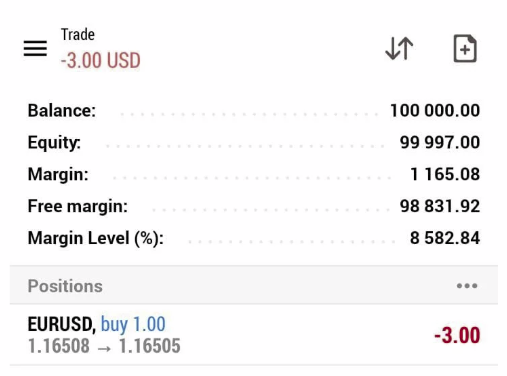
– In the Trade tab, you will see:
– Symbol (e.g. EURUSD, XAUUSD)
– Volume (Lot size)
– Open price
– Current price
– Profit (P/L)
👉 The Profit column shows your real-time (floating) profit or loss:
– Positive number (+) = Profit 
– Negative number (−) = Loss 
✅ Step 4: View Total Profit & Loss
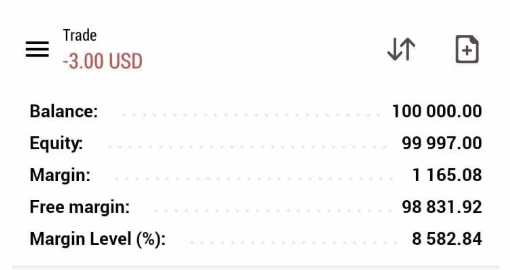
– At the top of the Trade tab, you can see:
– At the top of the Trade tab, you can see:
– Balance – money without open trades
– Equity – balance + floating P/L
– Margin & Free Margin
👉 The difference between Balance and Equity shows your overall floating profit or loss.
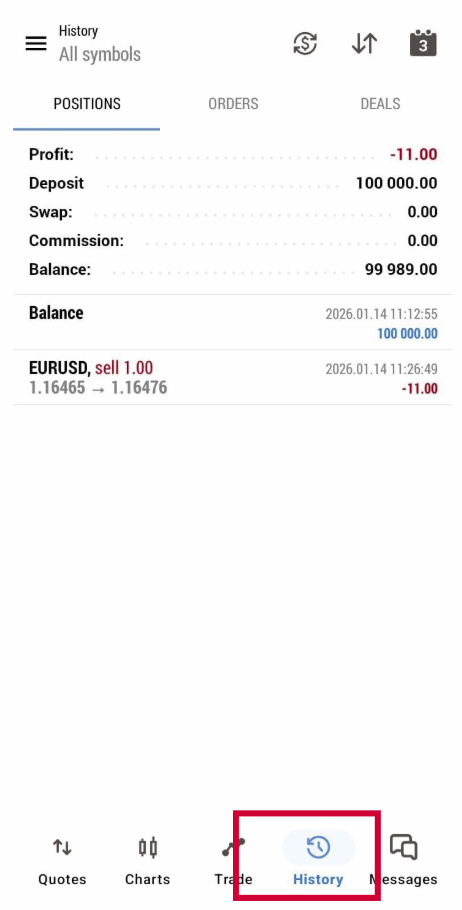
✅ Step 5: View Closed Trades (Past P/L)
– Tap History at the bottom menu.
– Select a time period (Today / Last Week / Custom).
– You’ll see:
– Closed trades
– Profit or loss for each trade
– Total P/L for that period