
Guidelines for View a Trading Report (Android Version)
 What Is a Trading Report?
A trading report shows your past trading activity, including:
– Closed trades
– Profit & Loss (P/L)
– Deposits & withdrawals
– Trading history within a selected period
📊 It helps you review performance and improve your strategy.
📱 Step-by-Step: How to View a Trading Report on MT5 (Android)
Step 1: Open the MT5 App
– Launch MetaTrader 5 on your Android device
– Log in to your trading account

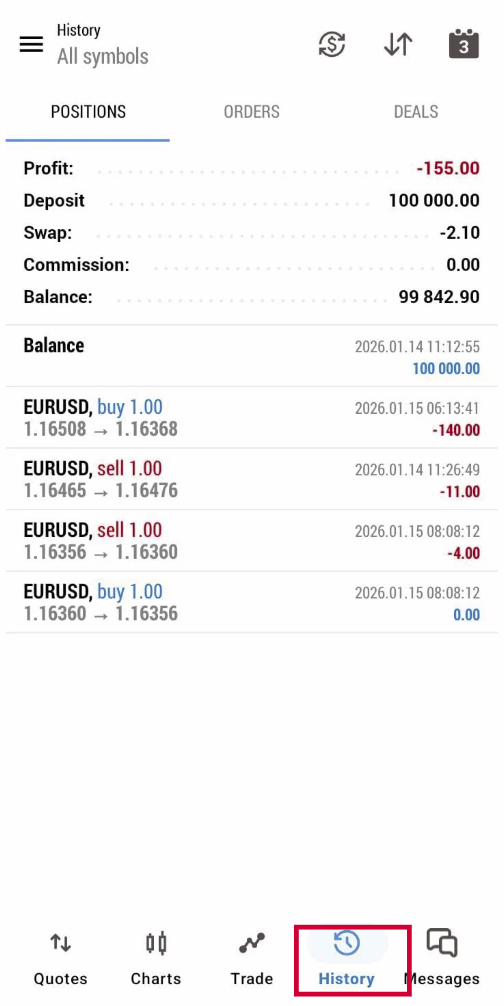
Step 2: Go to the “History” Tab
– Tap History at the bottom of the screen
– You will see your closed trades and transactions
– Tap History at the bottom of the screen
– You will see your closed trades and transactions
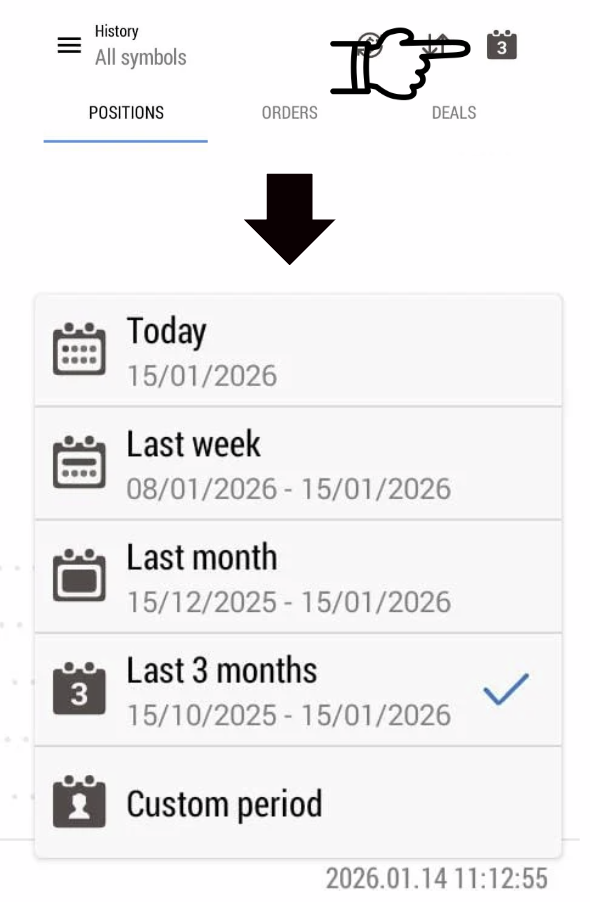
Step 3: Select the Time Period
– Tap the calendar icon on top left corner.
– Choose the report period:
– Today
– Last week
– Last month
– Last 3 months
– Custom period
– Tap the calendar icon
on top left corner.– Choose the report period:
– Today
– Last week
– Last month
– Last 3 months
– Custom period
Step 4: Generate the Trading Report
– MT5 Android can only view the trading history.
– If you would like to save the report, you can make a Screenshot from this page
– MT5 Android can only view the trading history.
– If you would like to save the report, you can make a Screenshot from this page