✅ How to Display from the Chart Screen
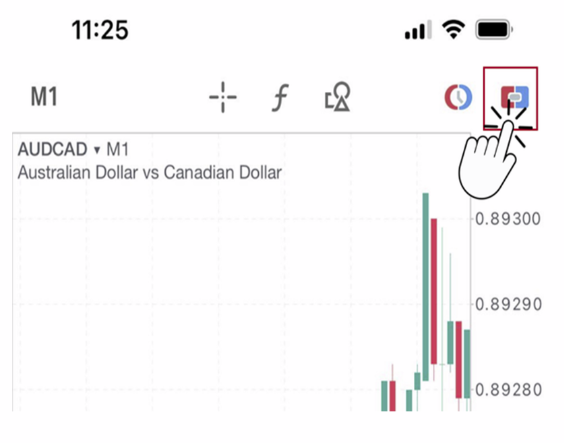
(1) On Chart Screen, tap the One-Click Trading button on the top right of the screen
One-Click Trading feature appears at the top of the chart.
(2) Click the ‘SELL’ or ‘BUY’ button to open the Terms and Conditions screen.
(3) Swipe the button to the right next to the sentence ‘I accept these Terms and Conditions’
Then, (4) tap the ‘Accept’ button.
One-Click Trading feature appears at the top of the chart.
(2) Click the ‘SELL’ or ‘BUY’ button to open the Terms and Conditions screen.
(3) Swipe the button to the right next to the sentence ‘I accept these Terms and Conditions’
Then, (4) tap the ‘Accept’ button.
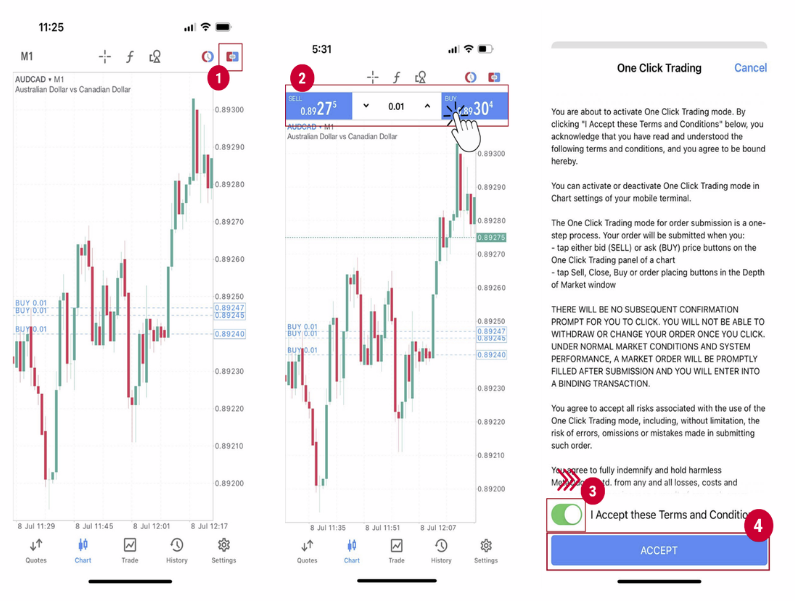
The set up is complete. You can now use the One-Click Trading feature.
✅ One-Click Trading in MT5
One-click orders are placed using the trading panel at the top right of the chart.
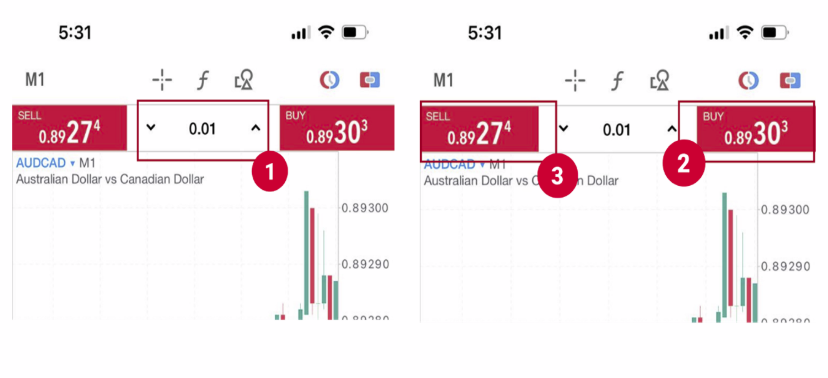
Enter the lot size in the upper center (1), and click (2) ‘BUY’ or (3) ‘SELL’ to place the order.