How to Check Your Positions on MT5 (Android Version)
Step 1 – Open MT5 App
– Tap the MetaTrader 5 icon on your Android device.
– Tap the MetaTrader 5 icon on your Android device.

Step 2 – Go to the Trade Tab
– Tap Trade at the bottom menu.
This screen shows two sections:
Positions – Your currently active/open trades
Orders – Pending orders (not active yet)
– Tap Trade at the bottom menu.
This screen shows two sections:
Positions – Your currently active/open trades
Orders – Pending orders (not active yet)
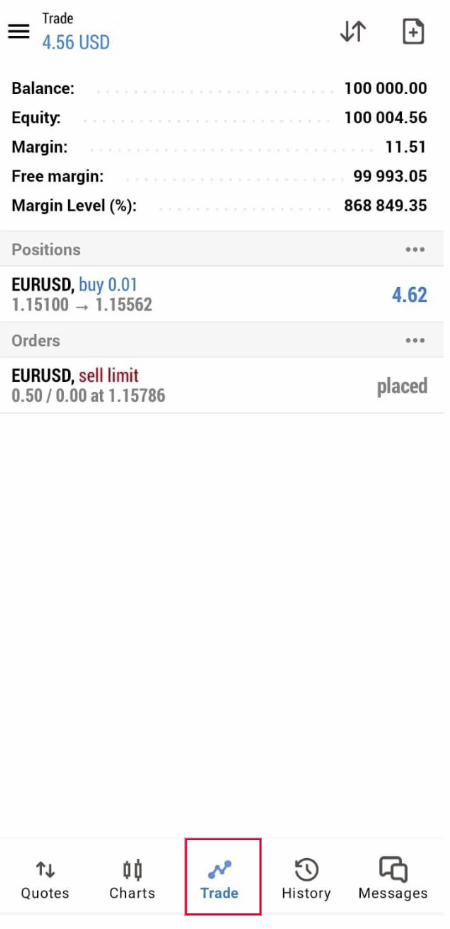
✅ What You Can See in the Positions Section
Each open trade will show:
Each open trade will show:
| Info | Meaning |
|---|---|
| Symbol (e.g., XAUUSD) | Instrument you’re trading |
| Volume (lot size) | Size of your trade |
| Direction | Buy or Sell |
| Entry price | The price where your trade opened |
| Current price | Live market price |
| SL/TP | Stop Loss / Take Profit (if set) |
| Profit | Current floating Profit/Loss (P/L) |
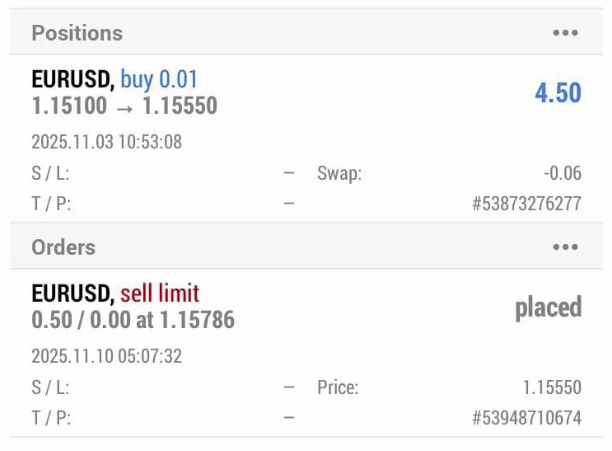
✅ Expand Position Details
For more details:
– Tap the open trade once OR tap & hold to open menu
– Choose Details
You can view:
– Order time
– Swap fees
– Commission (if any)
– Ticket number
– SL/TP levels