
How to Login to MT5 Platform (Android Version)
Step 1 – Open the MT5 App

- Tap the MetaTrader 5 icon on your Android device to launch the app.
Step 2 – Add Trading Account
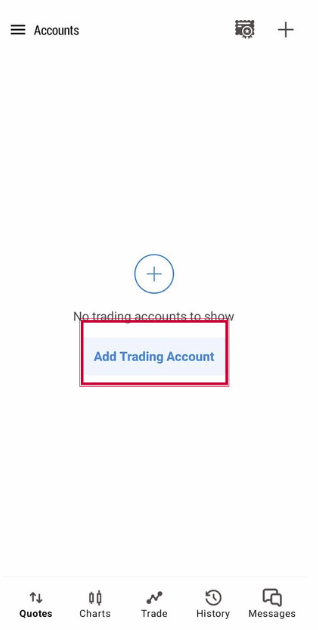
- Click “Add Trading Account”.
Step 3 – Search for Your Broker Server
- In the search bar, type the name of your broker (e.g., Hirose Solution Limited).
- Select the correct server (e.g., HiroseSolution-Live )
Step 4 – Enter Your Account Credentials
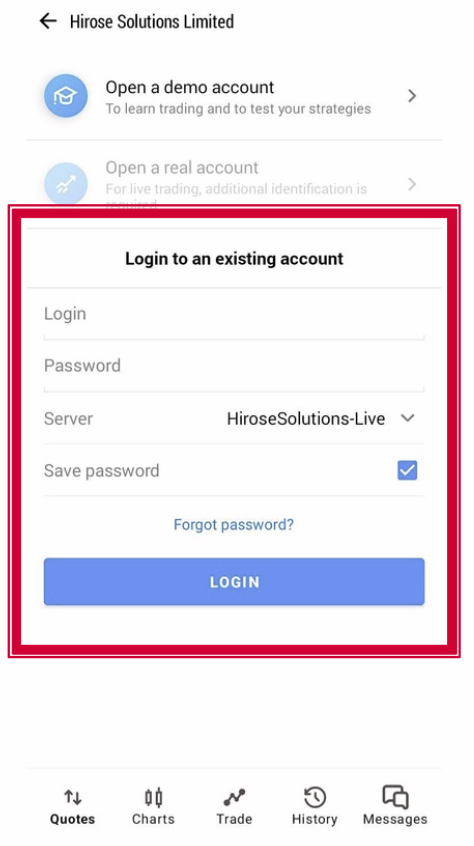
- Login: Your MT5 account number.
- Password: The trading password you received.
- Server: Choose server HiroseSolutions-Live
- Save Password (Optional)
Step 5 – Confirm Connection
- If login is successful, you’ll see live price quotes under the Quotes tab.
- The connection status at the top should turn green (indicating a live connection).
Step 6 – Start Trading
- Tap Quotes, Charts, or Trade tabs to begin monitoring and managing your trades.
✅ Tip: If you receive a “Login Failed” message:
- Double-check your account number, password, and server name.
- Make sure your internet connection is stable.