
KYC USDT PAYMENT SUBMISSION GUIDELINES
When requesting a USDT withdrawal, please provide the following screenshots.
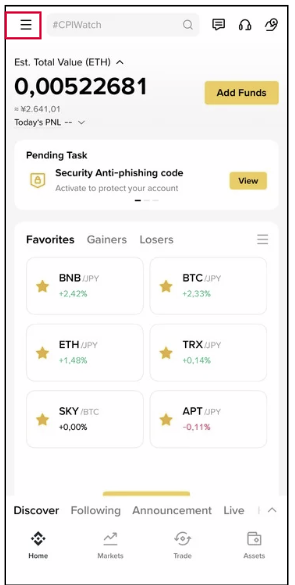
1. Access your Binance account, then click on the icon located at the top left corner of the Home screen.
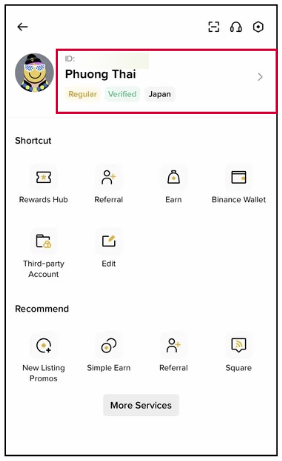
2. Click to your account name to go to Account Info section.
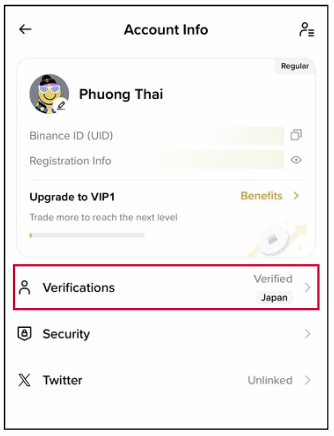
3. Click to Verification section to go to Verification Center.
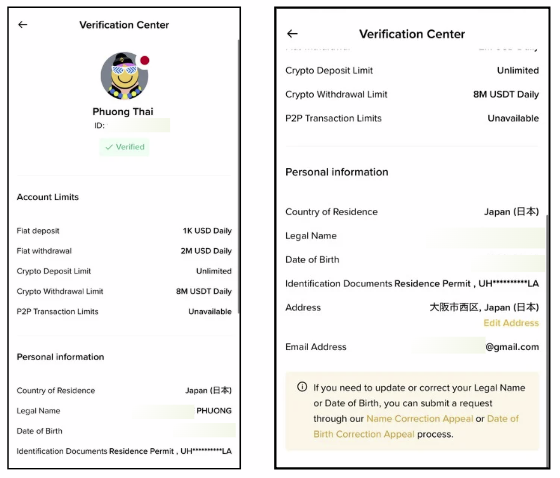
4. Screenshot the information in the Verification Center section.
Note that the KYC information for your Binance account and Hirose account must match.
5. Please send 2 additional screenshots, along with the QR code and the wallet address you want to use for KYC verification to withdraw USDT.

6. Please use Hirose’s Zalo contact information to send the required documents and screenshots.
 +84 76 806 9318