
Invalid Stop Loss (S/L) or Take Profit (T/P)
🔍 Common Causes & Easy Solutions
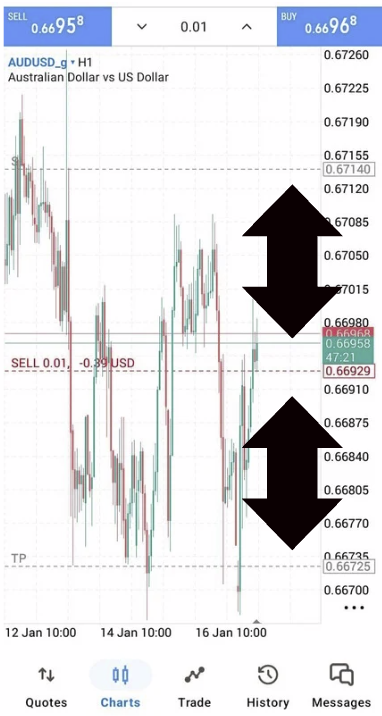
① Stop Loss/Take Profit Too Close to Market Price
Problem:
Your S/L or T/P is set too close to the current price.
Solution:
– Move S/L and T/P further away from the current market price
– Each symbol has a minimum distance (stop level)
✅ Tip:
Gold (XAU/USD) usually needs a wider distance than Forex pairs
② Symbol Has Trading Restrictions
Problem:
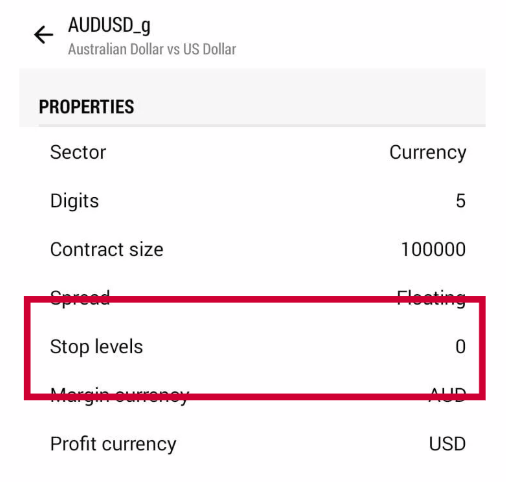
Some instruments have special rules (minimum stop level).
Solution:
– Open Quotes
– Tap and hold the symbol
– Select Properties
– Check Stop Level/ Minimum Distance
③ Market Is Too Volatile
Problem:
Fast price movement causes price to change before order is confirmed.
Solution:
– Increase distance of S/L & T/P
– Try placing order again
– Avoid trading during major news releases
④ Symbol Has Trading Restrictions
Problem:
Some instruments have special rules (minimum stop level).
Solution:
– Open Quotes
– Tap and hold the symbol
– Select Specification
– Check Stop Level / Minimum Distance
⑤ Using Too Many Decimal Places
Problem:
S/L or T/P price format is incorrect.
Solution:
– Let MT5 auto-calculate by using price arrows
– Avoid typing long decimal numbers manually
⑥ Pending Order Price Is Invalid
Problem:
For pending orders, the price is too close to current market price.
Solution:
– Place pending order further away from current price
– Recheck Buy Limit / Sell Limit rules