
How to Login to MT5 Platform (iOS Version)
Step 1 – Open the MT5 App
- Tap the MetaTrader 5 icon on your iPhone or iPad to open the app.
Step 2 – Access the Accounts Menu
- Tap “Settings” at the bottom right corner of the screen.
- Select “Trade Accounts”
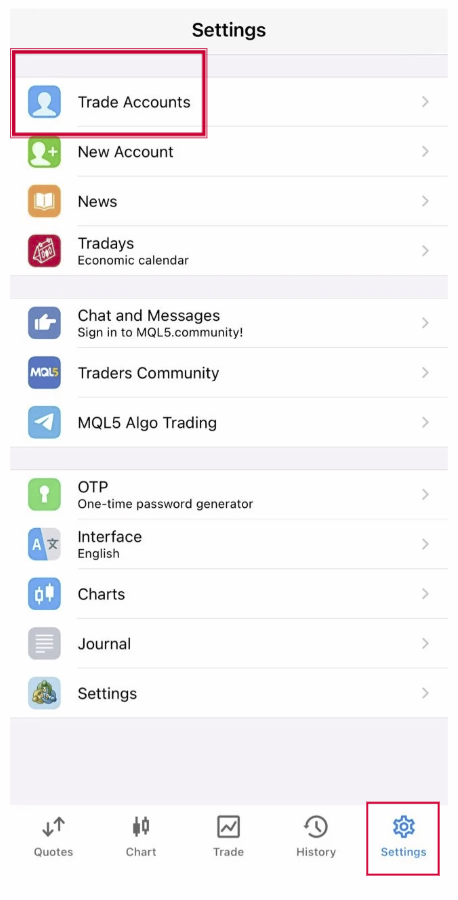
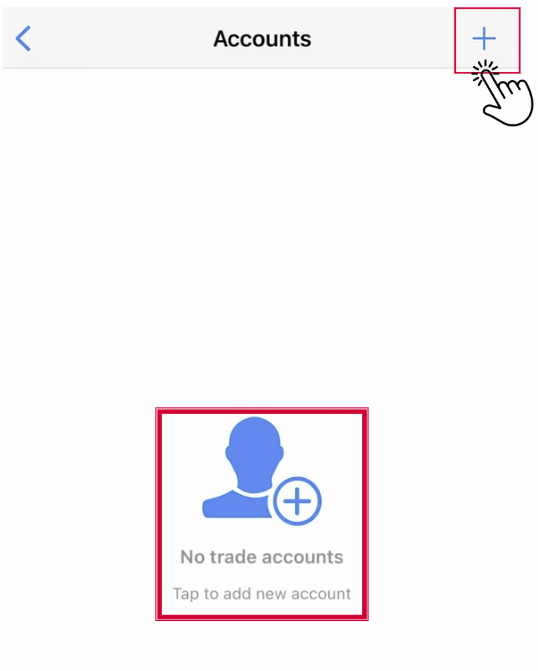
- Select “New Account.” or tap “+” at the upper right corner.
Step 3 – Search for Your Broker Server
- In the search bar, type the name of your broker (e.g., Hirose Solution Limited).
- Select the correct server (e.g., HiroseSolution-Live )
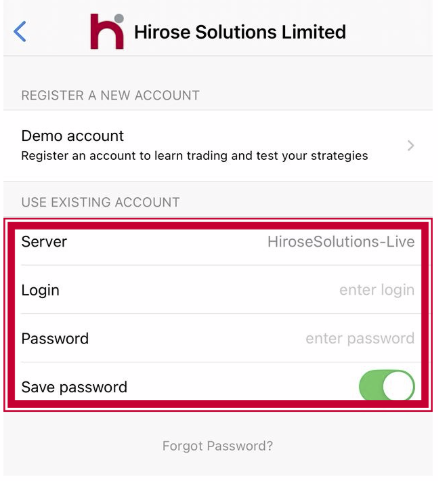
Step 4 – Enter Your Account Credentials
- Server: Choose server HiroseSolutions-Live
- Login: Your MT5 account number.
- Password: The trading password you received.
- Save Password (Optional)
Step 5 – Verify Connection
- Once logged in successfully, you’ll see live quotes displayed under the Quotes tab.
- The connection indicator (green/red bars) will show you are connected to the server.
Step 6 – Start Trading
- Use the Quotes, Chart, and Trade tabs at the bottom to monitor the market and place orders.