HIROSE MT4 Original Indicators
Enhance Your Trading Experience!
Get Our Exclusive Original MT4 Indicators Today and Take Your Strategy to the Next Level
OCT_AddOn(STD).ex4
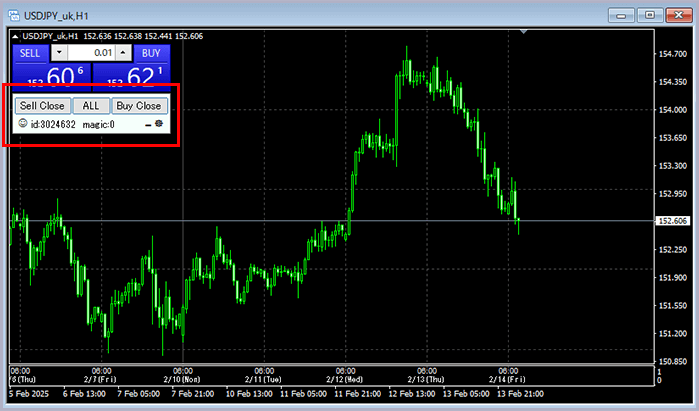
This indicator is designed to close all positions with a specified magic number in bulk. In MT4, when closing multiple positions, you typically need to close each one individually. However, by using this indicator, you can close all positions with a single click.
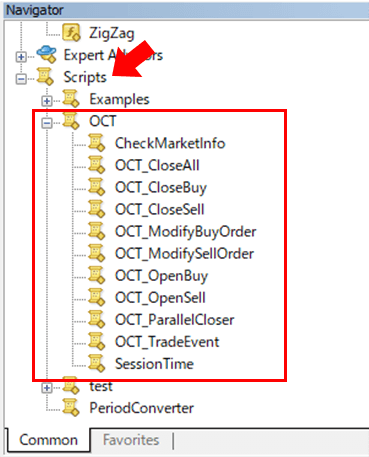
Normally, indicators cannot close positions, but by installing the OCT Script file, this functionality is enabled. As a result, it is also possible to run an EA on the same chart.
1. Version Information
2025.02.01 Version 1.00 Released
2025.02.14 Version 1.01 Bug Fixes
2. How to Set Up
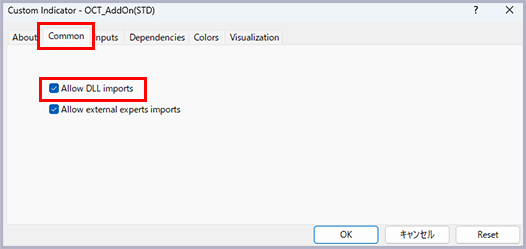
This indicator uses a DLL, so please make sure to check the option to allow DLL imports.
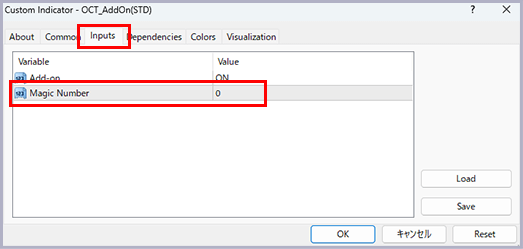
A magic number is an identifier used to distinguish the method of trading. Generally, when a position is created manually in discretionary trading, the number 0 is assigned. In the case of automated trading using an EA, a custom number is assigned through the EA settings.
When using this indicator to close positions in bulk, it will close all positions with the specified magic number for the currency pair set in the indicator.
3. How to Use
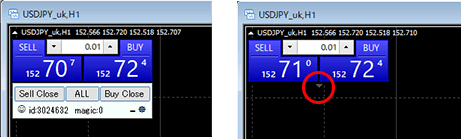
The basic usage is simply clicking the close button to complete the trade.
If the indicator is in the way, you can hide it by clicking the minimize button. To display it again, click the triangle button located below the One Click Trading panel.
4. If the indicator is not working:
- Please check if the option to allow DLL imports is enabled in the settings panel.
- Ensure that the magic number matches the positions you want to close.
- Check if the OCT script is placed in the Script folder.